

Dead laptop / no power
Short circuits, power IC, charging circuit and MOSFET faults.
Power IC repair →Ram Infotech repairs laptop motherboards with failed BGA chips — graphics (GPU), chipset/PCH and other ball-grid-array ICs — using BGA rework stations and controlled heating profiles. If your laptop powers on with no display, shows lines or artifacts, or crashes under load, a BGA fault may be the cause. We diagnose first, explain whether reballing or chip replacement is needed, and share an estimate before work starts. Available through our 10 Chennai branches.
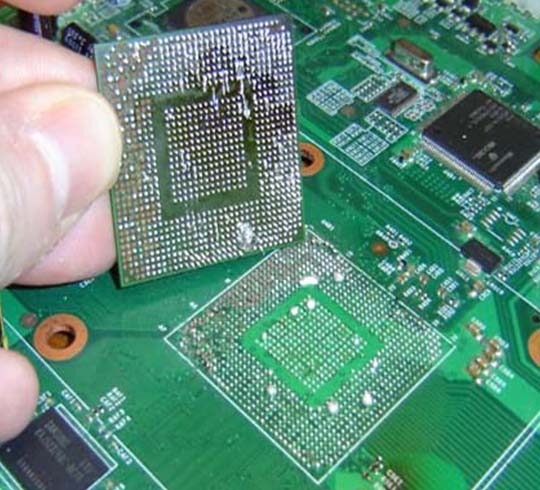
BGA rework is the process of removing, re-soldering or replacing a Ball Grid Array (BGA) chip on a laptop motherboard. BGA chips — such as the graphics processor (GPU), chipset (PCH / south bridge) or a soldered CPU — connect to the board through hundreds of tiny solder balls underneath. Heat cycles over time can crack these joints or damage the chip. A rework station heats the chip with a controlled temperature profile so it can be lifted, the pads cleaned, new solder balls applied (reballing) and the chip — or a replacement — soldered back precisely.
| Service | Laptop BGA rework, GPU/chipset reballing and BGA chip replacement |
|---|---|
| Chips handled | NVIDIA / AMD graphics chips, Intel / AMD chipsets (PCH, south bridge, north bridge), soldered CPUs, VGA ICs |
| Laptops | Gaming and business laptops — Dell, HP, Lenovo, Asus, Acer, MSI, Apple MacBook and more |
| Typical turnaround | Usually 24–48 hours including testing, subject to diagnosis and chip availability |
| Where | Any of Ram Infotech's 10 Chennai branches (Mon–Sat, 10 AM–8 PM) |
These symptoms can also come from RAM, display or power faults, so a proper diagnosis comes first.
| Method | What it does | When it is used | Durability |
|---|---|---|---|
| Reflow | Reheats the existing solder balls without removing the chip | Rarely recommended; quick test only | Often temporary |
| Reballing | Removes the chip, cleans pads, applies new solder balls and re-solders it | Cracked or weak solder joints, chip itself healthy | Long-lasting when done correctly |
| Chip replacement | Replaces the failed BGA chip with a new or tested chip | Chip is damaged, burnt or internally failed | Long-lasting; depends on chip availability |
We check power rails, RAM, display and the chip to confirm a BGA fault — not guess it.
You get the recommended fix (reballing or replacement), cost and time before work starts.
Board preheating and a temperature profile matched to the chip help prevent warping.
The laptop is stress-tested for display, drivers and heat before handover.


Short circuits, power IC, charging circuit and MOSFET faults.
Power IC repair →SMD component replacement, track repair and BIOS issues.
Motherboard service →Corrosion cleaning and repair after water or drink spills.
Learn more →Fan replacement, cleaning and thermal paste to protect the GPU.
Laptop service →Audio IC, USB and LAN port faults on the motherboard.
LAN port repair →Recover files from the drive when the motherboard has failed.
Data recovery →The final price is confirmed after diagnosis. It mainly depends on:
Standard graphics chips cost less than high-end gaming or workstation GPUs.
Reballing a healthy chip costs less than replacing a damaged chip.
Some chips must be sourced, which can affect price and time.
Additional faults found during diagnosis are quoted separately.
As a guide, BGA rework for standard graphics chips typically ranges from ₹2,500 to ₹4,500, and for high-end gaming/workstation GPUs from ₹4,500 to ₹6,500. Chip replacement, if required, is quoted separately. Check current offers →
Bring your laptop to any branch — chip-level jobs are handled by our motherboard team. Call first to confirm timings.
Landmark: Ellai Muthamman Amman Koil Street
Call: +91 9841983632
Landmark: Near Ganapathyram Theatre, opp. TVH Apartments
Call: +91 9841983690
Landmark: Behind Thoraipakkam Bus Stop
Call: +91 9841983680
Landmark: Near Porur Signal, opp. Axis Bank ATM
Call: +91 9841983692
Landmark: Opposite Latha Super Market
Call: +91 9841983629
Landmark: Vikas Plaza, next to Poorvika Mobiles
Call: +91 9841983665
Landmark: Near OT Bus Stop and SBI Bank
Call: +91 9841983642
Landmark: Opposite Valluvar Gurukulam School
Call: +91 9841983666
Landmark: Near The Cake Smith
Call: +91 9841983638
Landmark: Atul Flats
Call: +91 7448744841
Tell us your laptop brand, model and symptoms. Our chip-level team will call you back.
BGA rework is the repair of a Ball Grid Array chip on a laptop motherboard, such as the GPU, chipset or a soldered CPU. The chip is heated with a controlled profile, removed, the pads are cleaned, new solder balls are applied and the chip or a replacement is soldered back.
Common signs are power on with no display, vertical lines or artifacts on screen, display driver crashes, blue screens or freezing during gaming, and a laptop that works only when the board is pressed or warmed. A diagnosis is needed to confirm the cause.
Reflow only reheats the existing solder balls and is often a temporary fix. Reballing removes the chip, cleans the pads, applies fresh solder balls and re-solders the chip, which is longer lasting. If the chip itself is damaged, it must be replaced.
At Ram Infotech, BGA rework typically ranges from ₹2,500 to ₹4,500 for standard graphics chips and ₹4,500 to ₹6,500 for high-end gaming and workstation GPUs. Chip replacement is quoted separately and the final price is confirmed after diagnosis.
We rework gaming and business laptops including Dell Alienware, HP Omen and Pavilion, Lenovo Legion and ThinkPad, Asus ROG and TUF, Acer Predator and Nitro, Apple MacBook and MSI.
BGA rework with testing usually takes 24 to 48 hours. It can take longer if a replacement chip has to be sourced or other board faults are found.
Ram Infotech provides a service warranty on BGA rework. Warranty terms depend on the repair type and are written on your job card, so please confirm them with the branch.
No. No display can also be caused by RAM, the screen, the display cable or power circuits. We diagnose the board first and only recommend BGA rework when a chip fault is confirmed.
You can bring your laptop to any of Ram Infotech's 10 Chennai branches: Vadapalani, Adyar, OMR/Thoraipakkam, Porur, Madipakkam, Velachery, Ambattur, Tambaram, Guduvanchery or Villivakkam.
Call +91 98419 83643, WhatsApp +91 94447 07490, or phone your nearest branch. Branches are open Monday to Saturday, 10 AM to 8 PM.
Get a chip-level diagnosis and BGA rework estimate from Ram Infotech.
Ram Infotech is an independent multi-brand laptop service provider; manufacturer-authorised status is not implied. Repair feasibility is confirmed after inspection.
